

Description
Lightweight Screenshot Tool with Social Sharing
Overview
3C is a lightweight desktop screenshot tool designed for users who need fast, efficient capture and sharing of screen content. It enables users to capture specific regions of their screen or entire web pages, offering a streamlined workflow for visual documentation and content creation. The software is particularly useful for professionals and casual users who frequently share screenshots across social media platforms.
It addresses common pain points such as time-consuming editing processes and fragmented sharing workflows. By integrating direct export options to Imgur, Twitter, Facebook, Pinterest, and Reddit, 3C reduces the number of steps required to publish visual content. This makes it ideal for bloggers, educators, customer support teams, and social media managers who rely on quick, on-the-go visual communication.
Developed by Virtex Edge, 3C is an open-source application, allowing transparency and community-driven improvements. The software was first released in 2015 and has since evolved through incremental updates, with the latest version (1.2.0) released in 2018. Its lightweight footprint of 1.4 MB ensures minimal impact on system resources, making it suitable for older or low-spec machines.
Key Features & Capabilities
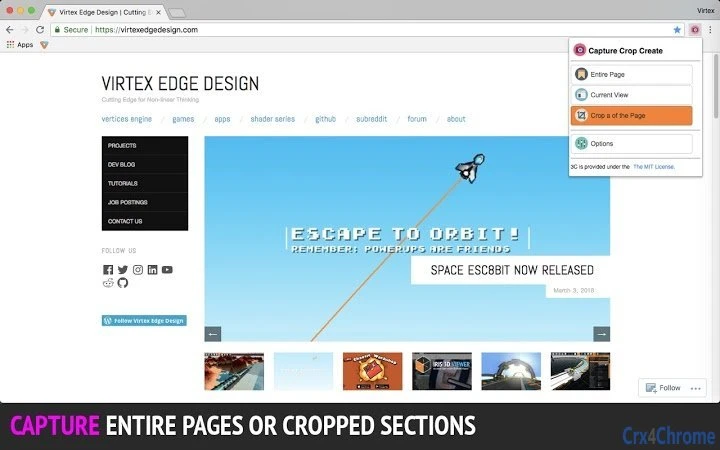
- Region and Full-Page Capture: Users can select specific areas of the screen or capture entire web pages, ideal for documenting UIs, web content, or troubleshooting steps.
- On-the-Fly Image Editing: Basic editing tools allow users to crop, resize, and adjust images directly within the application, reducing the need for external software.
- Direct Social Media Sharing: Screenshots can be shared instantly to Imgur, Twitter, Facebook, Pinterest, and Reddit, streamlining content distribution.
- Open-Source Transparency: The source code is publicly available, enabling developers to inspect, modify, and contribute to the project.
- Adjustable Crop Resizer: A customizable tool allows users to fine-tune the dimensions of cropped images before saving or sharing.
These features support practical workflows such as creating tutorial guides, reporting bugs with visual evidence, or sharing discoveries on social platforms. The integration with major social networks reduces friction in content publishing, while the open-source nature encourages trust and long-term usability.
User Interface, Workflow & Performance
The user interface of 3C is designed with simplicity and speed in mind. The application likely features a minimalistic layout with accessible capture tools, such as a selection cursor or hotkey triggers, enabling users to initiate captures with few clicks.
Navigating through the tool’s functions appears intuitive, with a focus on reducing user effort during the capture and sharing process. The workflow is optimized for rapid execution—capture, edit, share—without requiring multiple application switches.
Performance details were not specified by the developer. However, the software’s 1.4 MB size suggests efficient resource usage, likely resulting in low CPU and memory consumption. Stability is expected to be consistent given the application’s long-standing presence and incremental updates. The developer did not specify resource usage details, but general software behavior patterns suggest smooth operation on supported platforms.
Compatibility & System Requirements
3C is compatible with Windows, Mac, and Linux operating systems, making it a cross-platform solution for users across different environments. The application is available in a desktop version, with a file size of 1.4 MB, indicating a lightweight installation.
Exact system requirements were not listed. The developer did not provide additional system requirements. However, given its minimal size and cross-platform availability, it is likely designed to run on machines with modest hardware specifications.
Pros and Cons
Pros
- Lightweight design with minimal system impact
- Direct sharing to major social platforms
- Open-source with full code transparency
- Supports both region and full-page captures
- Includes basic image editing tools
Cons
- No advanced editing features beyond cropping and resizing
- Outdated release date (2018) raises questions about current maintenance
- Limited documentation or user guides provided
- Performance and compatibility details not fully disclosed
FAQ Section
Is 3C available for Windows, Mac, and Linux?
Yes, 3C is compatible with Windows, Mac, and Linux operating systems.
Is 3C secure to use?
As an open-source application, 3C allows users to inspect its code for potential vulnerabilities. However, no independent security audit was mentioned in the provided information.
Does 3C require an internet connection?
Yes, an internet connection is required for sharing screenshots to external platforms like Imgur, Twitter, Facebook, Pinterest, and Reddit.
Can I use 3C offline?
Yes, the core capture and editing functions can be used offline. However, sharing features require an active internet connection.
Is 3C free to use?
Yes, 3C is available at no cost and does not require a license key or subscription.
Final Thoughts + CTA
3C delivers a focused, efficient solution for users who need quick screen capture and social sharing without bloat. Its lightweight design, open-source foundation, and direct integration with major platforms make it a compelling choice for content creators and professionals seeking simplicity.
While the software has not seen updates since 2018, its core functionality remains relevant. Users who value transparency, minimalism, and direct sharing will find 3C to be a reliable tool. For those seeking a no-frills screenshot utility with community trust, it stands out in the utilities category.
Download 3C now
Guides & Tutorials for 3C-Cut Crop Capture Extension for Chrome
How to install 3C-Cut Crop Capture Extension for Chrome
- Click the Preview / Download button above.
- Once redirected, accept the terms and click Install.
- Wait for the 3C-Cut Crop Capture Extension for Chrome download to finish on your device.
How to use 3C-Cut Crop Capture Extension for Chrome
This software is primarily used for its core features described above. Open the app after installation to explore its capabilities.
User Reviews for 3C-Cut Crop Capture Extension for Chrome 0
No reviews found





